The AstraVerify seal: how to add it to your website
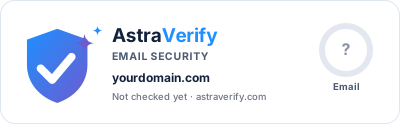
The seal is a small image, 400 by 124 pixels, served live from astraverify.com. It shows your domain, your Email Security score and, when SPF, DKIM and DMARC are all in place with DMARC enforced, the words "Email authenticated: SPF, DKIM and DMARC enforced, verified by AstraVerify". A visitor who clicks it lands on your public report, so the claim can be checked.
It is free, needs no account, and updates itself: it is drawn from the latest check of your domain, so it cannot show a result you no longer have. If your DMARC policy ever breaks, the seal changes on the next check.
What the seal says, and when
The wording is earned, not chosen. "Email authenticated" appears only when the domain has an SPF record, a DKIM key for the mail provider, and a DMARC record with p=quarantine or p=reject. Anything less shows "Email security checked" with the score. That rule is what makes the seal worth showing: a visitor knows it means the same thing on every site.
It never claims your website or application is secure. It says one thing, that email from the domain is authenticated, which is the claim a visitor needs when deciding whether a message really came from you.
Get your snippet
- Name
HTML (replace yourdomain.com twice)- Type
html- Value
<a href="https://astraverify.com/?domain=yourdomain.com"><img src="https://astraverify.com/seal/yourdomain.com.svg" alt="Email from yourdomain.com is authenticated, verified by AstraVerify" width="400" height="124"></a>
- Check your domain at astraverify.com. Fix anything open under "Optimization recommendations"; the exact records are listed there.
- On the result page, press Embed seal under the scores. The email seal is preselected; copy the HTML or Markdown snippet.
- Paste it where visitors look for trust signals: the footer, the contact page, or a "Security" or "About" page.
Where to paste it on common platforms
- Name
Markdown (replace yourdomain.com twice)- Type
markdown- Value
[](https://astraverify.com/?domain=yourdomain.com)
- WordPress: Appearance, Editor (or Customize), footer widget or Custom HTML block; paste the HTML snippet. If your theme escapes HTML in widgets, use a Custom HTML block on a page instead.
- Shopify: Online Store, Themes, Edit code, then the footer section file (usually sections/footer.liquid); paste the snippet inside the footer markup, or use a Custom Liquid section.
- Squarespace: Settings, Advanced, Code Injection, Footer; or a Code block on any page.
- Webflow: drag an Embed element into the footer and paste the HTML.
- Wix: Add, Embed code, Embed HTML; paste the snippet. It renders inside an iframe, so give the element 420 by 140 pixels.
- GitHub README or any Markdown page: use the Markdown snippet from the Embed seal panel.
- Any hand-built site: paste the HTML snippet in the footer template so it appears on every page.
Other variants
Add ?type=full to the image URL for a seal with both scores (Email Security and Discoverability), which suits a README or a client report, or ?type=discoverability for the Discoverability score alone, which suits documentation sites and publishers who want to show they are readable by search and AI crawlers. The default, with no parameter, is the email seal.
Keeping it current
The seal reflects the most recent check of your domain, and it keeps itself current: while the seal is in use on your site, AstraVerify re-checks the domain every week on its own, so what it shows is never more than a week old. Anyone can also re-check the domain from astraverify.com at any time. Monitoring adds the part a seal cannot do: an email within a day of any change.
The image is small (about 3 KB), has no scripts and sets no cookies on your visitors. It records only that it was requested, so the domain owner can see how often the seal is shown.
Frequently asked questions
- My seal says "Email security checked" instead of "Email authenticated". Why?
- One of the three requirements is missing: an SPF record, a DKIM key that the scan can find (or that you confirmed by sending a test email), or a DMARC record with p=quarantine or p=reject. p=none does not count, because it asks receivers to do nothing about spoofed mail. Your report lists which one is open and the exact record to publish.
- Does the seal slow my page down?
- No. It is one small SVG image with explicit width and height, so it does not shift your layout, and it is loaded from astraverify.com rather than your server.
- Can I style it or change the wording?
- You can scale it with CSS (keep the 400:124 ratio) and place it anywhere. The wording is fixed on purpose: it is the same for every site, which is what makes it meaningful.
- What happens if I remove it?
- Nothing. Delete the snippet and it is gone; there is nothing to cancel and no account involved.
- Does it work for a subdomain or a second domain?
- Yes. Each domain has its own seal at /seal/<domain>.svg. Check the domain first so there is a result to show; until then the seal reads "Not checked yet".
Check your own domain. The scan shows your live records, a score out of 100 and the exact record to publish for each fix.
Related guides
- What is DMARC? Policies, alignment and reports explained
- What is DKIM? DomainKeys Identified Mail explained
- What is SPF? Sender Policy Framework explained
- How the AstraVerify email security score works
Canonical: https://astraverify.com/domain-trust-seal